Build a website with Org mode and Emacs
Most website tools ask for a framework, a template language and a build system before the first sentence gets written. Org mode asks for much less. The writing happens in plain text files in Emacs, and Emacs turns them into HTML. No Node, no Ruby, no Go, no database. The tool that does the work, ox-publish, has shipped with Org for years, and Org ships with Emacs.
This guide builds a small but complete site from scratch: a home page, an about page, a blog with an index that updates itself, a stylesheet, images, highlighted code, a one-command build, a local preview and a deploy. Every step explains what it does and why, so it's easy to bend to taste afterwards.
What Org mode is #
Org mode is a major mode for Emacs, created by Carsten Dominik in 2003 and part of Emacs itself since version 22. People use it for notes, to-do lists, agendas, spreadsheets, literate programming and writing. Underneath all of that, an Org file is just text with a light markup, a bit like Markdown, but with a lot more built in.

The part that matters here is the exporter. Org can turn the same file into HTML, LaTeX, PDF, ODT, Markdown and plain text. On top of the exporter sits the publishing system, ox-publish, which exports a whole folder of files at once, copies images and stylesheets along, and keeps track of what changed. That's a static site generator, already installed.
Real sites run on it. Worg, the community wiki of the Org project, is written in Org files and published with this same machinery.
What it takes #
- Emacs, any recent version. Org comes with it.
- A terminal, to run the build.
- Python 3 or any small web server, only to preview the site locally.
- Somewhere to host the result later: a personal server, or a static host like GitHub Pages, Codeberg Pages or SourceHut pages.
No Emacs expertise required. The work is editing a few text files and running one command.
A crash course in Org markup #
For anyone who has never written Org, this is enough to build a site. Headings start with stars, and more stars mean a deeper level:
* A top heading
** A sub-heading
*** And another level
Inline formatting:
*bold*,/italic/,_underlined_and+struck through+=verbatim=and~code~for monospace text
Links and images use double brackets. A link to a file that is an image becomes an image on the page:
[[https://orgmode.org][The Org website]]
[[file:about.org][About me]]
[[file:img/photo.jpg]]
Lists, tables, quotes and code blocks:
- an item
- another item
1. a numbered item
| Name | Language |
|------+----------|
| Org | Elisp |
#+BEGIN_QUOTE
Plain text lasts.
#+END_QUOTE
#+BEGIN_SRC python
print("Hello")
#+END_SRC
And the lines starting with #+ at the top of a file are settings. #+TITLE becomes the page title, #+DATE the date and #+DESCRIPTION the meta description.
One handy detail: a link to another .org file, like [[file:about.org]], becomes a link to about.html when the site is published. Links go between the source files, and Org fixes the extensions.
Step 1: the folder structure #
Create this layout. The writing lives in content/, and the finished site appears in public/.
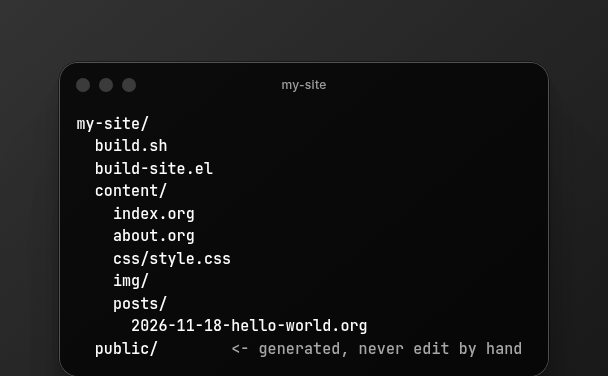
mkdir -p my-site/content/posts my-site/content/css my-site/content/img
cd my-site
Keeping sources and output apart is the most important habit here. public/ is disposable: it can be deleted at any time and the build recreates it. Anything edited by hand in there is lost on the next build.
Step 2: write the content #
content/index.org, the home page:
#+TITLE: My little corner of the web
#+DESCRIPTION: Notes, essays and experiments.
Hello! This site is written in plain text with Org mode and built by Emacs.
* Start here
- [[file:about.org][About me]]
- [[file:posts/index.org][Every post, newest first]]
content/about.org:
#+TITLE: About
I write about the things I build and the things I learn.
You can reach me by email at [[mailto:you@example.org][you@example.org]].
And the first post, content/posts/2026-11-18-hello-world.org:
#+TITLE: Hello, world
#+DATE: <2026-11-18 Wed>
#+DESCRIPTION: The first post on a site built with Org mode.
* Why this site exists
This page was written in *plain text*, with /no/ HTML at all.
Emacs and =org-publish= turned it into a web page.
* A bit of code
#+BEGIN_SRC python
print("Hello from Org!")
#+END_SRC
The #+DATE line matters for posts: the blog index uses it to sort them. Inside Emacs there's no need to type the date by hand. C-c . opens a calendar and inserts it in the right format.
Notice that index.org links to posts/index.org, a file nobody wrote. The build creates it, in step 4.
Step 3: a stylesheet #
Org's default HTML is clean but plain. A few lines of CSS go a long way. Save this as content/css/style.css:
body { max-width: 42rem; margin: 2rem auto; padding: 0 1rem; font: 18px/1.6 Georgia, serif; color: #222; background: #fdfcf8; }
nav { margin-bottom: 2rem; }
nav a { margin-right: 1rem; }
h1, h2, h3 { line-height: 1.25; }
a { color: #8a3b12; }
pre { background: #f3f1ea; padding: 1rem; overflow-x: auto; }
img { max-width: 100%; height: auto; }
footer { margin-top: 3rem; font-size: 0.9rem; color: #666; }
To skip writing CSS altogether, a classless stylesheet like Simple.css or Water.css works well with Org's output, since Org produces plain, semantic HTML.
Step 4: the build script #
This is the heart of the site. Create build-site.el at the root of the project:
;; build-site.el: turns content/ into a website in public/
;; 1. Keep the packages this build needs inside the project
(require 'package)
(setq package-user-dir (expand-file-name "./.packages"))
(setq package-archives '(("melpa" . "https://melpa.org/packages/")
("elpa" . "https://elpa.gnu.org/packages/")))
(package-initialize)
(unless package-archive-contents
(package-refresh-contents))
(package-install 'htmlize)
;; 2. Load the publishing system
(require 'ox-publish)
;; 3. Keep publishing timestamps inside the project too
(setq org-publish-timestamp-directory (expand-file-name "./.timestamps/"))
;; 4. HTML settings shared by every page
(setq org-html-validation-link nil
org-html-head-include-scripts nil
org-html-head-include-default-style nil
org-html-doctype "html5"
org-html-html5-fancy t
org-html-head "<link rel=\"stylesheet\" href=\"/css/style.css\">"
org-html-preamble "<a href=\"/\">Home <a href=\"/posts/\">Posts <a href=\"/about.html\">About"
org-html-postamble "Written in Org mode, built with Emacs.")
;; 5. How each post shows up in the posts index
(defun my/sitemap-entry (entry style project)
(if (directory-name-p entry)
entry
(format "%s: [[file:%s][%s]]"
(format-time-string "%Y-%m-%d" (org-publish-find-date entry project))
entry
(org-publish-find-title entry project))))
;; 6. The projects: posts, pages and static files
(setq org-publish-project-alist
(list
(list "posts"
:base-directory "./content/posts"
:base-extension "org"
:publishing-directory "./public/posts"
:publishing-function 'org-html-publish-to-html
:section-numbers nil
:with-toc nil
:with-author nil
:time-stamp-file nil
:auto-sitemap t
:sitemap-filename "index.org"
:sitemap-title "Posts"
:sitemap-style 'list
:sitemap-sort-files 'anti-chronologically
:sitemap-format-entry 'my/sitemap-entry)
(list "pages"
:base-directory "./content"
:base-extension "org"
:publishing-directory "./public"
:publishing-function 'org-html-publish-to-html
:section-numbers nil
:with-toc nil
:with-author nil
:time-stamp-file nil)
(list "static"
:base-directory "./content"
:base-extension "css\\|js\\|png\\|jpg\\|jpeg\\|gif\\|svg\\|webp\\|ico"
:publishing-directory "./public"
:recursive t
:publishing-function 'org-publish-attachment)
(list "site" :components '("posts" "pages" "static"))))
;; 7. Build everything, ignoring what was built before
(org-publish-all t)
(message "Build complete!")
That's a lot at once, so here's what each part does.
Part 1 sets up Emacs' package manager inside the project folder, in .packages, so the build never touches the personal Emacs configuration. It installs one package, htmlize, which Org needs to color the code in source blocks. Without it, the build stops with "Cannot fontify source block (htmlize.el >= 1.34 required)".
Part 2 loads ox-publish, the publishing system.
Part 3 moves Org's record of what it already published from the home folder into the project. It's a small thing that keeps every project self-contained.
Part 4 shapes every page:
org-html-validation-link nilremoves the old "Validate" link Org adds at the bottom.- The two
includesettings switch off Org's built-in CSS and JavaScript, since the site has its own stylesheet. doctype "html5"andhtml5-fancymake Org use modern tags like<nav>,<section>and<figure>.org-html-headadds the stylesheet to every page.- The preamble goes at the top of each page, so it's a good place for the navigation. The postamble goes at the bottom, which suits a footer.
Part 5 is a small function that decides how each post appears in the posts index: the date from #+DATE, followed by the title as a link. org-publish-find-date and org-publish-find-title read those values from each file.
Part 6 defines the projects. A project is a folder Org knows how to publish:
- posts exports every
.orgfile incontent/poststo HTML.:auto-sitemap tmakes Org write a list of all posts intoposts/index.orgbefore publishing, newest first because ofanti-chronologically. That generated file becomes the blog index, at/posts/. - pages exports the
.orgfiles at the top ofcontent: the home page and the about page. It isn't recursive, so it leaves the posts alone. - static copies everything that isn't Org, like CSS, scripts and images, exactly as it is.
org-publish-attachmentmeans "copy, don't convert". - site groups the three, so a single name builds everything. The order matters: posts come first, because the home page links to
posts/index.org, which only exists after the posts project has generated it.
The :section-numbers, :with-toc, :with-author and :time-stamp-file lines turn off things that feel bookish on a website: numbered headings, a table of contents at the top, the author line and a "created" timestamp. Turn any of them back on for a page that needs it.
Part 7 runs the whole thing. The t forces a full rebuild every time, which avoids confusing moments where a change doesn't show up because Org thinks the file is already up to date.
Step 5: build with one command #
Create build.sh next to it:
#!/bin/sh
emacs -Q --script build-site.el
Make it executable and run it:
chmod +x build.sh
./build.sh
-Q starts Emacs without any personal configuration, so the build behaves the same on any machine, including a server or a CI job. --script runs the file and exits, without opening a window. The first run takes a little longer while it downloads htmlize. After that, public/ holds the site:
public/
index.html
about.html
css/style.css
posts/index.html
posts/2026-11-18-hello-world.html
Step 6: preview it #
The navigation uses links that start with /, so open the site through a small web server rather than double-clicking the files. Python has one built in:
cd public
python3 -m http.server 8000
Then visit http://localhost:8000. Change a file, run ./build.sh again and reload the page.
To stay inside Emacs, the simple-httpd package does the same job: install it from MELPA, run M-x httpd-serve-directory and point it at public/. It serves on port 8080 by default.
Working from inside Emacs #
The build script is the reliable way to publish, but Org's export menu is handy while writing. Inside any Org file:
C-c C-e: open the export menuC-c C-e h h: export the current file to HTMLC-c C-e h o: export it and open the result in the browserC-c C-e P f: publish the current file with its project settingsC-c C-e P p: publish the current projectC-c C-e P a: publish every projectC-c C-l: insert a link, with completion for file pathsC-c .: insert a date from a calendar
The P commands need org-publish-project-alist loaded in the running Emacs. One way is to keep the project definitions in a separate file and load it from the configuration.
Images #
Put images in content/img/ and link to them with a path relative to the Org file:
[[file:img/sunset.jpg]]
From a post inside posts/, go one level up:
[[file:../img/sunset.jpg]]
To add a caption, alt text or a size, put these lines right above the link:
#+CAPTION: The view from the window, at the end of the day
#+ATTR_HTML: :alt A sunset over the hills :width 600
[[file:../img/sunset.jpg]]
The static project copies the image to public/img/, so the same relative path works on the published site. If an image is missing from the output, check that its extension is in the :base-extension list of the static project.
Better code highlighting #
By default, htmlize writes the colors straight into each code block, using whatever theme the build happens to have. With emacs -Q, that's the default light theme. To control the colors with CSS instead, add this to part 4 of build-site.el:
(setq org-html-htmlize-output-type 'css)
Now the code blocks carry CSS classes instead of colors. To get a stylesheet for them, open a normal Emacs session with the preferred theme, run M-x org-html-htmlize-generate-css, and save the buffer it produces as content/css/code.css. Then load it next to the main stylesheet:
org-html-head "<link rel=\"stylesheet\" href=\"/css/style.css\"><link rel=\"stylesheet\" href=\"/css/code.css\">"
Per-page settings #
Everything set in the build script can be changed for a single page with #+ lines at the top of the file. For example, a long guide that deserves a table of contents and numbered sections:
#+TITLE: A long guide
#+OPTIONS: toc:t num:t
And to add something only to the <head> of one page:
#+HTML_HEAD_EXTRA:
The order of priority is simple: settings inside a file win over the project settings, which win over the global variables.
Publishing it #
The finished site is just files in public/, so anything that serves files can host it.
To a personal server, with rsync:
./build.sh
rsync -avz --delete public/ you@your-server:/var/www/my-site/
The --delete flag removes files from the server that no longer exist locally, so deleted pages disappear online too. On the server, any web server pointing at that folder will do.
For GitHub Pages, Codeberg Pages or SourceHut pages, the idea is to run build.sh and upload the contents of public/, by hand or from a CI job that installs Emacs and runs the same script. That's the payoff of emacs -Q --script: the build doesn't depend on anyone's personal setup.
With the site in git, commit the sources and the build files, and leave the generated and downloaded folders out with a .gitignore:
public/
.packages/
.timestamps/
Common errors and what they mean #
- "Unable to resolve link": a
[[file:...]]link points to an Org file that doesn't exist. Usually a typo, or a page that hasn't been written yet. Org stops the build on purpose, so broken internal links never get published. - "Cannot fontify source block (htmlize.el >= 1.34 required)":
htmlizeisn't installed. Part 1 of the build script takes care of it, so check that it ran, and that the machine could reach MELPA. - The navigation works online but not when the files open directly: links starting with
/point to the root of a web server. Use the preview server from step 6. - A change doesn't show up: make sure the build ran again, and that the browser is looking at
public/, notcontent/. Thetinorg-publish-all talready rules out stale caches. - An image or CSS file is missing: its extension isn't in the static project's
:base-extension.
Going further #
What this guide builds covers a personal site and a simple blog. For more, there's a whole ecosystem around Org publishing:
- RSS: the
ox-rsspackage, on MELPA, exports Org files to an RSS feed that can sit next to the posts. - ox-hugo: write in Org, and let Hugo build the site. Useful for anyone who wants Hugo's themes and features but prefers Org for writing.
- org-static-blog: a small package focused on blogs, with an archive, tags and an RSS feed out of the box.
- weblorg: a static site generator for Emacs with templates, for sites that outgrow a plain
ox-publishsetup.
Worg keeps a page that compares many of these tools, listed below.
A good path is to start with plain ox-publish, as in this guide. It's built in, it will keep working as long as Emacs does, and every piece of it is a few lines of Emacs Lisp anyone can read and change. The bigger tools make sense once it's clear exactly what's missing. And when the site starts to grow, [Org mode as a digital garden](https://pablomurad.com/org-mode-digital-garden/) is the second part of this guide, with ideas from a site that has been tended this way for years.
Study sources #
- The Org Manual: Publishing, the official reference for
ox-publish - The Org Manual: Options for the exporters, every project property and the variable behind it
- The Org Manual: Generating a sitemap, the options used for the posts index
- The Org Manual: Complex publishing example, a site with pages, images and stylesheets
- Worg: Publishing Org-mode files to HTML, a classic tutorial on splitting a site into components
- System Crafters: Build Your Website with Org Mode, a guide to building a site from a script with
emacs -Q - Worg: Blogs and wikis with Org, a list of tools for blogging with Org
- Org-mode on Wikipedia, for the history of the project