Linked notes in Emacs: Denote, org-roam and org-node
The Obsidian posts here (an Obsidian vault that lasts, the two plugin lists and the 50 tricks) all orbit the same idea: small notes, linked to each other, stored as plain files. Emacs can do the same thing, and it has three serious packages for it: Denote, org-roam and org-node. They solve the same problem with very different ideas about where the structure of a note collection should live.
This guide walks through all three from an empty config to a working setup, with real screenshots from a small test collection about the small web. It assumes Emacs is installed and Org mode feels familiar. If not, Org mode from zero covers the basics and Emacs for the curious covers installing packages.
What a note system needs #
Before looking at any package, it helps to agree on the job. A collection of linked notes needs four things:
- A stable way to name a note. Titles change. A link that breaks every time a title changes is useless after a year.
- Fast finding. Typing a few letters of a title and jumping there, in under a second, with hundreds or thousands of notes.
- Linking. Inserting a link to another note without leaving the keyboard and without typing a path.
- Backlinks. From any note, seeing which other notes point to it. This is what turns a folder of files into a web of ideas.
Org mode alone already has links and search. What these packages add is the naming scheme, the fast lookup and, above all, the backlinks.1
The three, side by side #
Denote keeps everything in the file name. Each note gets a name like 20261103T214000--gemini__protocols_smallweb.org, with a timestamp that works as a permanent ID, the title and the keywords. There is no database. Finding notes is a matter of matching file names, and backlinks come from searching the files for links. Requires Emacs 28.1 or newer.
org-roam keeps the structure in an SQLite database. Each note (a file, or a heading inside a file) gets an Org ID, and org-roam indexes titles, aliases, tags and links into the database so lookups and backlinks are instant. It is the oldest and most used of the three, with the biggest ecosystem. Requires Emacs 27.1 or newer.
org-node reads the same kind of notes as org-roam, with the same Org IDs, but keeps its index in memory, rebuilt in the background, with no database at all. It is younger, very fast, and can sit next to org-roam on the same files. Requires Emacs 29.1 or newer.
Denote #
Denote was introduced in June 2022 by Protesilaos Stavrou, the author of the Modus themes that ship with Emacs.2 Its central idea is that the file name should carry everything needed to identify a note, so the notes keep working in any program, from ls to a phone's file manager. The 4.3 series came out in November 2026 (4.3.1 is the current release on GNU ELPA), and the changelog is worth a look after installing.
The file name is the note's identity #
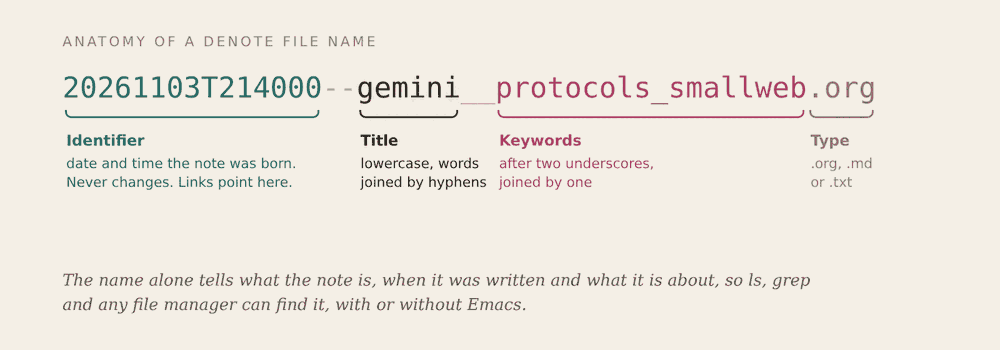
Every Denote file name follows the same pattern:
- Identifier: the date and time of creation, as
20261103T214000. It never changes, and every link points to it. - Title: after two hyphens, in lowercase, with words joined by single hyphens.
- Keywords: after two underscores, joined by single underscores.
- Extension:
.org,.mdor.txt.
Because of this pattern, a plain directory listing already works as an index. Sorting by name sorts by date. Searching for _unix finds every note tagged unix. Renaming a title changes the name but leaves the identifier alone, so links survive.
Installing and configuring #
Denote is on GNU ELPA, so it installs with no extra archives. A starting config, adapted from the manual:
(use-package denote :ensure t :hook (dired-mode . denote-dired-mode) :bind (("C-c n n" . denote) ("C-c n r" . denote-rename-file) ("C-c n l" . denote-link) ("C-c n b" . denote-backlinks) ("C-c n d" . denote-dired) ("C-c n g" . denote-grep)) :config (setq denote-directory (expand-file-name "~/notes/")) (setq denote-known-keywords '("smallweb" "protocols" "unix" "history")) (denote-rename-buffer-mode 1))
denote-directory is where notes live. denote-known-keywords is just a starting list for completion; any new keyword typed at the prompt is accepted. denote-rename-buffer-mode gives each note's buffer a readable name instead of the long file name.
Creating a note #
C-c n n runs denote. It asks for a title, then for keywords:
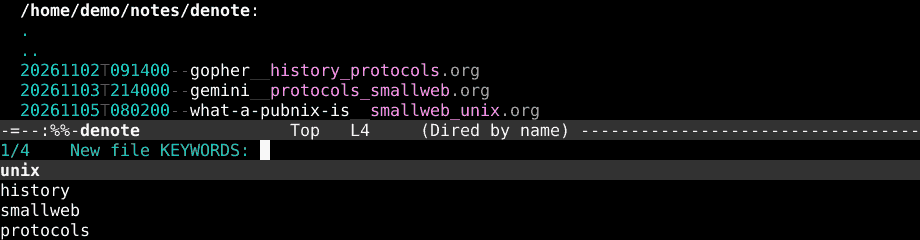
Several keywords can be picked at once (separated by commas). Denote then creates the file with its name already built and writes a small front matter at the top:
#+title: Gemini #+date: [2026-11-03 Tue 21:40] #+filetags: :protocols:smallweb: #+identifier: 20261103T214000
Below that, it's an ordinary Org file. Headings, lists, code blocks, agenda items: everything from Org mode works as usual.
There are other entry points for the same thing. denote-open-or-create jumps to an existing note or creates one if nothing matches. denote-region turns the selected text into a new note. denote-org-capture plugs Denote into Org capture templates, for creating notes from anywhere in Emacs.
Seeing the collection in Dired #
With denote-dired-mode on, Dired colors each part of the name, which makes a long listing easy to scan:
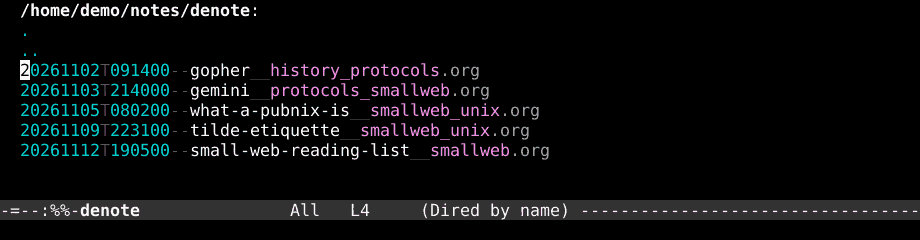
C-c n d (denote-dired) goes further and opens a Dired buffer filtered by a regular expression and sorted by identifier, title or keywords. Asking for _smallweb gives a live listing of every note with that keyword.
Links and backlinks #
C-c n l (denote-link) asks for a note and inserts a link at point. In Org files the link looks like this:
It borrows the simplicity of [[denote:20261102T091400][Gopher]].
The link targets the identifier, so the title on the other side can change freely. denote-link-or-create does the same, but creates the target note when it doesn't exist yet, which fits the habit of linking to an idea before writing about it.
C-c n b (denote-backlinks) opens a buffer listing every note that links to the current one, with the line where each link appears:
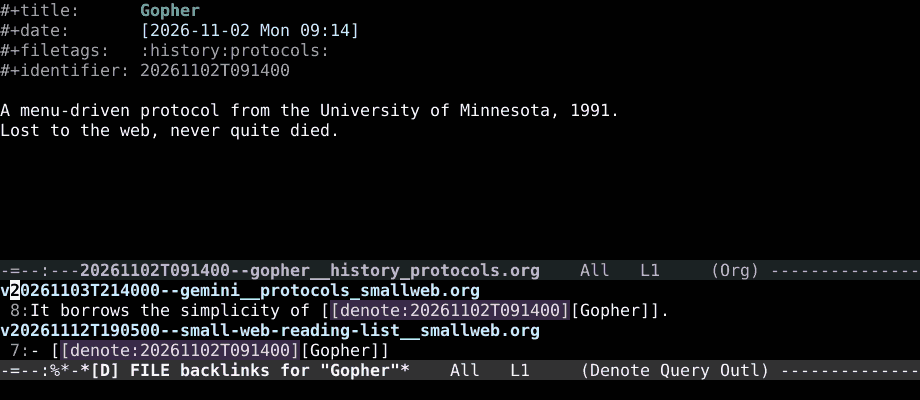
Since there's no index, Denote finds these by searching the files each time. That stays quick for collections of a few thousand notes, especially with ripgrep installed. denote-find-link and denote-find-backlink do the same job through the minibuffer, for jumping straight to one of them.
Renaming without breaking anything #
C-c n r (denote-rename-file) prompts for a new title and keywords and renames the file, keeping the identifier. There are narrower versions too: denote-rename-file-title and denote-rename-file-keywords change just one part. When the front matter was edited by hand, denote-rename-file-using-front-matter reads the title and tags from the top of the file and fixes the file name to match.
Renaming also works on files Denote didn't create. Running denote-rename-file on an old note or a PDF gives it an identifier and brings it into the collection.
The companion packages #
Since version 4.0, Denote keeps its core small and moves extras into separate packages, all on GNU ELPA:
- denote-journal: a daily journal on top of Denote.
denote-journal-new-or-existing-entryopens today's entry, creating it if needed, anddenote-journal-calendar-modemarks days with entries in the Emacs calendar. - consult-denote: integrates with Consult, adding
consult-denote-findandconsult-denote-grepwith live previews. - denote-silo: silos are separate note directories, each with its own
denote-directory. Work and personal notes can live apart and still use the same commands. - denote-sequence: gives notes hierarchical numbers (1, 1=1, 1=2, 2...), close to the folgezettel scheme from Luhmann's card boxes.
- denote-org and denote-markdown: extras for each file type, such as Org dynamic blocks that list notes by keyword.
The file type is chosen with denote-file-type. Core Denote writes Org, Markdown with YAML or TOML front matter, and plain text. That makes it the easiest of the three to share with Obsidian: point both at the same folder, set the file type to markdown-yaml, and the notes work in either program (Obsidian won't follow denote: links, but the files and front matter are fine).
org-roam #
org-roam started in 2020, by Jethro Kuan, as an Emacs take on Roam Research, the web app that made backlinks popular.3 It's built on two Org features: the ID property, which gives any file or heading a unique identifier, and id: links, which point to that identifier.
In org-roam, a node is any file or heading with an ID. A file with ten headings, each with its own ID, holds eleven nodes, and each can be linked to and found on its own. A typical node file looks like this:
:PROPERTIES: :ID: 5b1f0c2a-6d1e-4c3b-9a57-2f0e8d4b1c90 :END: #+title: Gopher #+filetags: :protocols:history:
A menu-driven protocol from the University of Minnesota, 1991.
File names don't matter to org-roam. The default template names files with a timestamp and a slug, but they can be anything.
Installing and configuring #
org-roam is on MELPA. It depends on emacsql (to talk to SQLite), magit-section (for its side buffer) and a recent Org. On Emacs 29 and newer, emacsql uses the SQLite support built into Emacs, so nothing external needs to be compiled.
(use-package org-roam :ensure t :custom (org-roam-directory (file-truename "~/notes/roam/")) :bind (("C-c n l" . org-roam-buffer-toggle) ("C-c n f" . org-roam-node-find) ("C-c n i" . org-roam-node-insert) ("C-c n c" . org-roam-capture) ("C-c n j" . org-roam-dailies-capture-today)) :config (org-roam-db-autosync-mode))
org-roam-db-autosync-mode keeps the database in sync every time a note is saved. Without it, the database has to be rebuilt by hand with org-roam-db-sync.
The C-c n prefix here is the same one Denote's manual uses. Running both at once means picking a different prefix for one of them.
Finding, inserting, capturing #
C-c n f (org-roam-node-find) lists every node by title, aliases included. Typing a name that doesn't exist offers to create it, through a capture template. C-c n i (org-roam-node-insert) works the same way but inserts an id: link at point:
Text-first protocol from 2019. It borrows the simplicity of [[id:5b1f0c2a-6d1e-4c3b-9a57-2f0e8d4b1c90][Gopher]].
C-c n c (org-roam-capture) creates or appends to a node using templates, the same mechanism as Org capture.
A few commands handle metadata on the current node:
org-roam-alias-add: extra names for the node. The Gemini note in the test collection has the alias "Project Gemini", and both names find it.org-roam-tag-add: tags, stored as Org tags.org-roam-ref-add: a URL or citation key that the node is about. Later, visiting that URL from a browser extension or a citation manager leads back to the note.
And two commands reshape notes as they grow: org-roam-extract-subtree turns a heading into its own file, keeping the ID, and org-roam-refile moves a heading into another node.
The org-roam buffer #
C-c n l (org-roam-buffer-toggle) opens a side buffer that follows the current node and shows its backlinks, each with the paragraph around the link:
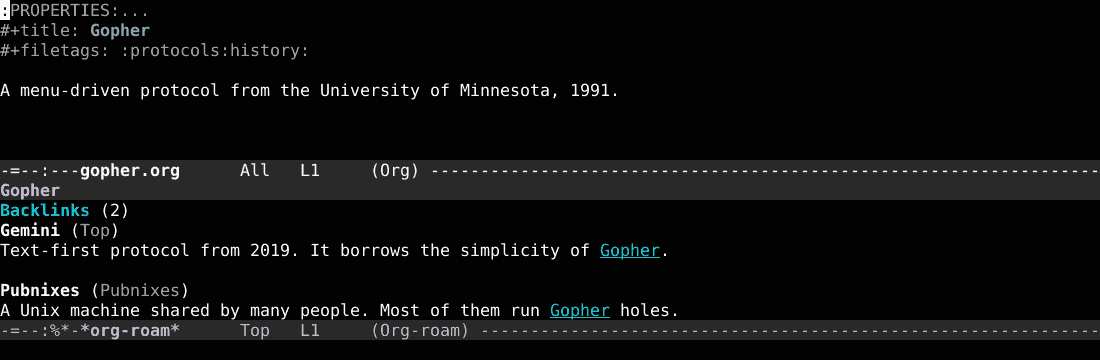
Notice that one of the backlinks to Gopher comes from Pubnixes, which is a heading inside another file. That's node granularity at work: the link is attributed to the heading, not just the file. The buffer can also show reference links and unlinked references (places that mention the title as plain text).
Dailies #
org-roam-dailies, included with org-roam, keeps a file per day. C-c n j (org-roam-dailies-capture-today) adds an entry to today's file and org-roam-dailies-goto-today opens it. Since dailies are ordinary nodes, linking from a day's entry to a topic note makes that day show up in the topic's backlinks, which gives every topic a free timeline.
The database, and the graph #
The SQLite database lives in org-roam-db-location (by default, org-roam.db inside the Emacs directory). It holds only derived data: deleting it and running org-roam-db-sync rebuilds everything from the Org files. It shouldn't be synced between machines; each machine builds its own.
For a visual map, org-roam-ui serves an interactive graph of the database in the browser, similar to Obsidian's graph view.
org-node #
org-node is by Martin Edström, and it began as an answer to the slowness of org-roam on very large collections. It reads the same notes (files and headings with Org IDs, linked with id: links), but it indexes them with a companion package, org-mem, which scans the files in parallel background processes and keeps the results in memory. There's no SQLite and no database file.
The author's own benchmark, on his machine with 3,000 nodes, puts a full index at about 2 seconds with org-node against 2 minutes and 48 seconds with org-roam.4 Day-to-day use doesn't rebuild everything, so the difference shows up most at startup and on large collections.
Installing and configuring #
Both packages are on MELPA. The recommended config from the org-node manual:
(use-package org-mem :ensure t :config (setq org-mem-watch-dirs (list "~/notes/roam/")) (org-mem-updater-mode))
(use-package org-node :ensure t :init (keymap-global-set "M-o n" org-node-global-prefix-map) (with-eval-after-load 'org (keymap-set org-mode-map "M-o n" org-node-org-prefix-map)) :config (org-node-cache-mode))
org-mem-watch-dirs lists the folders to index. org-mem-updater-mode keeps the index current as files are saved, and org-node-cache-mode connects org-node to it. Everything is under M-o n, which avoids clashing with Denote or org-roam on C-c n.
Finding and linking #
org-node-find lists every node, with headings shown under their file's title:
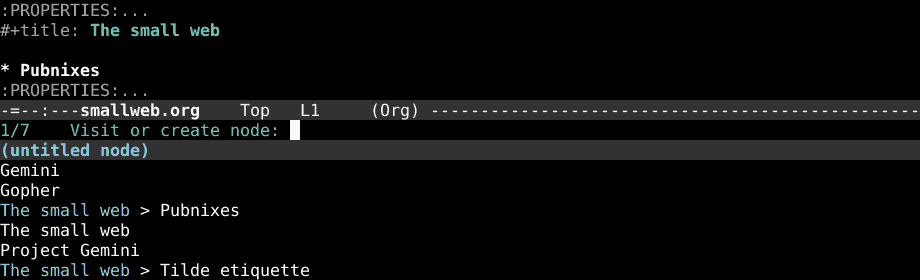
The list includes "Project Gemini", read from the same ROAM_ALIASES property that org-roam uses. There's no separate command for new nodes: typing a name that doesn't exist into org-node-find or org-node-insert-link creates it.
Other commands cover the same ground as org-roam's: org-node-refile, org-node-extract-subtree, org-node-rename-file-by-title (renames the file to match the title), org-node-grep and org-node-insert-heading (a new heading that already has an ID).
Backlinks, two ways #
org-node offers backlinks in two forms. org-node-context-toggle opens a side buffer, similar to the org-roam buffer. The other option, org-node-backlink-mode, is unusual: it writes the backlinks into the notes themselves, as a :BACKLINKS: property or drawer that updates when links change. The backlinks then exist in the files, visible to grep, to other programs and to anyone reading the notes without Emacs. The price is that files get edited automatically, which shows up in version control.
Living next to org-roam #
Since the on-disk format is the same, org-node can index an org-roam collection as it is. For people who want to keep using org-roam's buffer and dailies, the manual suggests these lines:
(setq org-mem-watch-dirs (list "~/notes/roam/")) (setq org-node-creation-fn #'org-node-new-via-roam-capture) (org-node-roam-accelerator-mode)
The first points org-mem at the org-roam folder. The second makes new nodes go through org-roam's capture templates. The third lets some org-roam commands use org-node's cache. A common path is to start this way and drop org-roam later, or keep both.
org-node doesn't cover everything org-roam does. It has no roam: links, and it doesn't separate collections into independent piles the way org-roam can with per-directory settings. For maintenance it has two good tools: org-node-lint-all-files checks the notes for common problems, and org-mem-list-dead-id-links lists id: links that point nowhere.
Choosing one #
Denote fits best when the files should outlive the tool. Nothing depends on a database, notes can be Markdown or plain text, and any file manager shows a readable index. It's the natural pick for a collection shared with Obsidian, a phone or a sync service, and for people who like small, well-documented packages. Its main limit is granularity: a note is a file, and links point to files (Org headings can be linked with extra setup, but it's not the default model).
org-roam fits when a heading-level graph and the existing ecosystem matter: capture templates, dailies, org-roam-ui, ref links, and years of guides and configs to copy from. On very large collections it gets slower, and the database is one more moving part.
org-node fits when org-roam's model is right but its speed isn't, or when the database is unwanted. It's also the easiest way to try a roam-style setup on top of existing Org files, since it doesn't need anything besides IDs. It requires Emacs 29.1, and its ecosystem is younger.
Moving between org-roam and org-node costs nothing, as they share the format. Moving between Denote and the other two means converting links (denote: to id:, or back), which is scriptable but takes some care.
Coming from Obsidian #
Most Obsidian habits map directly:
- Daily notes become denote-journal or org-roam-dailies.
- Tags become Denote keywords or Org file tags.
[[wikilinks]]becomedenote:orid:links, inserted with completion instead of typed by hand.- The backlinks pane becomes
denote-backlinks, the org-roam buffer or org-node's context buffer. - The graph view becomes org-roam-ui (for org-roam and org-node collections).
- The quick switcher becomes
denote-open-or-create,org-roam-node-findororg-node-find.
The biggest difference is renames. In Obsidian, renaming a note rewrites every link that points to it. In all three Emacs packages, links point to a permanent identifier, so renames don't need to touch other files at all.
Habits that make any of them work #
The package matters less than a few habits:
- One idea per note. Small notes link better than long ones. When a note keeps growing, split it (
org-roam-extract-subtree,org-node-extract-subtree, or a new Denote note made withdenote-region). - Link while writing. The best moment to link two ideas is when the connection is fresh. Linking to a note that doesn't exist yet is fine; all three can create it on the spot.
- Write the reason next to the link.
See [[Gopher]]says little.It borrows the simplicity of [[Gopher]]tells the future reader why the link is there, and that context shows up in the backlinks. - Keep keywords few. A short, stable list of keywords works better than a new tag for every note.
denote-known-keywordshelps by suggesting the existing ones. - Back up the folder. The notes are plain files, so any backup works. The 3-2-1 backups post has a full setup.
Cheat sheet #
With the configs above.
Denote:
- C-c n n: create a note
- C-c n l: insert a link to a note
- C-c n b: show backlinks
- C-c n r: rename the current note
- C-c n d: filtered Dired listing
- C-c n g: search inside notes
- M-x denote-open-or-create: open a note, or create it if missing
- M-x denote-journal-new-or-existing-entry: today's journal entry
org-roam:
- C-c n f: find or create a node
- C-c n i: insert a link to a node
- C-c n c: capture into a node
- C-c n l: toggle the backlinks buffer
- C-c n j: capture into today's daily
- M-x org-roam-alias-add: add another name to the node
- M-x org-roam-extract-subtree: turn the heading at point into its own file
org-node:
- M-x org-node-find: find or create a node
- M-x org-node-insert-link: insert a link to a node
- M-x org-node-context-toggle: toggle the context (backlinks) buffer
- M-x org-node-extract-subtree: turn the heading at point into its own file
- M-x org-mem-list-dead-id-links: list broken id links
- M-o n: org-node's prefix map, for everything else
-
The idea of small linked notes goes back to the Zettelkasten, the card box kept by the German sociologist Niklas Luhmann, which grew to about 90,000 cards over his career. The Niklas Luhmann-Archiv has digitized it, and the cards can be browsed online.
-
The Modus themes (modus-operandi and modus-vivendi) are built into Emacs since version 28. The screenshots in this post use modus-vivendi.
-
Roam Research popularized bidirectional links in note apps around 2019 and 2020. Obsidian, Logseq and org-roam all came out of that wave.
-
These are the author's numbers from the org-node README, measured on his own computer. Results on other machines and collections will differ, but the order of magnitude is the point.