Org mode as a digital garden
A few days ago I published Build a website with Org mode and Emacs, a guide to turning a folder of Org files into a static site with a build script. Then I came across Marco Bresciani's page Digital Garden, where he explains how his own site is put together, and it's fantastic. His site is made with Org too, but he runs it differently, and his setup covers several things my guide left out.
This post picks up those pieces, so read it as a second part: the first one gets a site running, and this one is about living with it for a long time. Thank you, Marco, for writing it all down and publishing the configuration along with it.
Gardens and streams #
A blog is a stream. Posts come out in order, the newest on top, and once something is published it mostly stays as it was. A digital garden works the other way: it's a set of notes and pages that you keep tending. You go back, rewrite, add links between pages, plant something new next to something old. Nothing is ever really finished, and the structure comes from the links, not from the dates. Maggie Appleton's A Brief History & Ethos of the Digital Garden is a good introduction to the idea, and Marco's page opens by pointing to it.
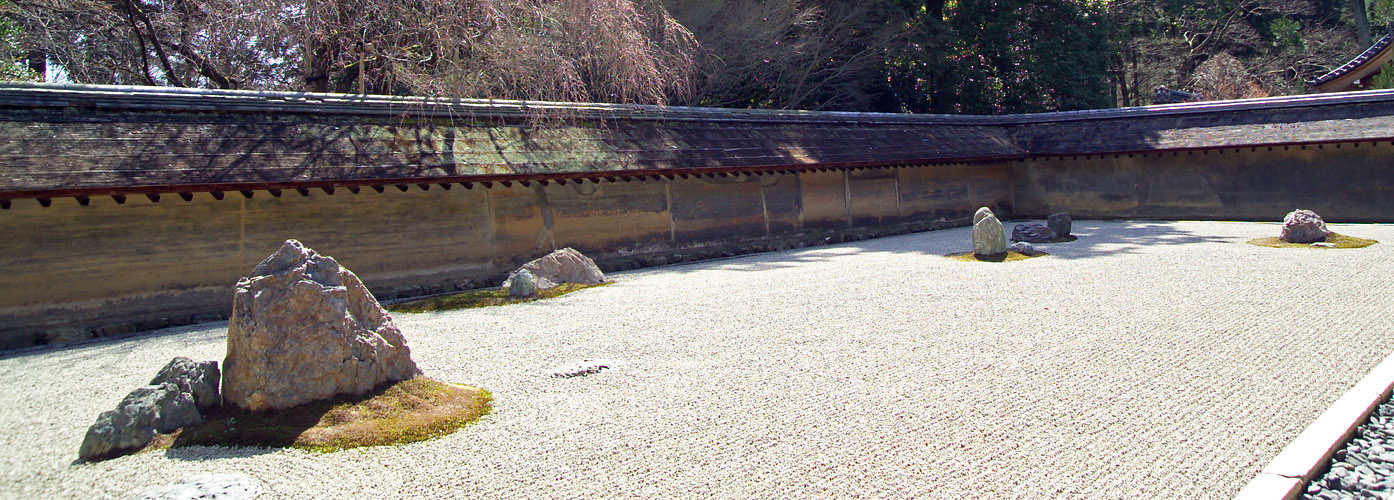
Marco calls his site "Knowledge 枯山水". 枯山水, karesansui, is the Japanese dry landscape garden: rocks, moss and raked gravel, with no water at all.1 His page follows the metaphor the whole way. Emacs and Org are the walls, the configuration is the gate, and the .org files are the garden.
Org suits this kind of site. Pages link to each other with [[file:...]], a page can be reorganized in seconds by moving headings around, and nothing in the format assumes that a page has a date.
Publishing from inside Emacs #
My guide builds the site from the terminal, with emacs -Q --script build-site.el. Marco does it from inside his running Emacs, which fits a garden where you edit a page and want to see it published right away.
His routine, in short:
- Open the publishing configuration,
publish.el, and runM-x eval-bufferto load it. - Open any page of the site, like
index.org, and pressC-c C-e P pto publish the project. - Find the HTML in the output folder, next to the sources.
Org only republishes the files that changed since the last run. When you want everything rebuilt, after changing the stylesheet or the export options for example, run C-u M-x org-publish and pick the project. The C-u prefix forces it, like the t in (org-publish-all t) in my build script.
The two ways don't compete. The script is what you want on a server or in CI, where nobody is there to press keys. The interactive way is nicer while you write.
Skipping the eval step with .dir-locals.el #
Step 1 above has to happen in every new Emacs session, and it's easy to forget. Marco mentions a way around it that he plans to try: Emacs' directory variables.
A file called .dir-locals.el at the root of a folder sets variables for every file opened inside that folder. If one of those variables is org-publish-project-alist, any Org file you open in the project already knows how to publish it, and C-c C-e P p just works. The file holds a list of variables and values, so the projects go in as data:
((nil .
((org-publish-project-alist
. (("garden"
:base-directory "/garden/org"
:base-extension "org"
:recursive t
:publishing-directory "/garden/pages"
:publishing-function org-html-publish-to-html))))))
The nil at the start means "for every major mode". Two things to know before you rely on it. The first time you open a file there, Emacs asks whether the value is safe, because publishing settings can name functions to run.2 Answering ! saves your answer, so it doesn't ask again. And changes to .dir-locals.el only reach buffers opened after the change. For a buffer that's already open, M-x normal-mode reloads it.
One limit: .dir-locals.el sets variables, it doesn't run code. Loading a package or defining a function still belongs in your configuration or in a file you load.
The stylesheet path problem #
Here my guide and Marco's setup solve the same problem in opposite ways, and the comparison is useful.
A stylesheet has to be linked from every page, and the link has to point to the right place. My guide puts it in the build script, with an absolute path:
org-html-head "<link rel=\"stylesheet\" href=\"/css/style.css\">"
The leading / means "from the root of the site", so the same line works on every page, at any depth. The cost is that it only works through a web server: open the HTML file straight from disk and the page has no styles. That's why the guide has a preview step with python3 -m http.server.
Marco went the other way. He puts a relative link at the top of each Org file, so the path changes with the folder the file sits in:
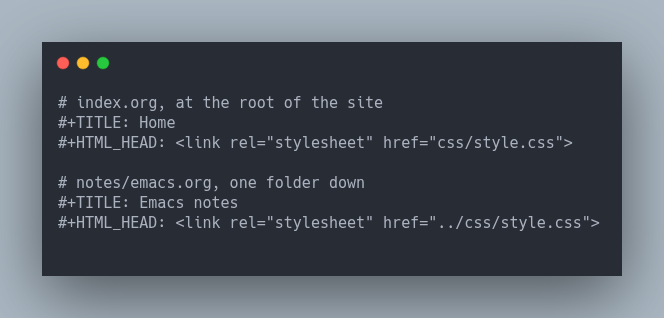
A relative path works from disk and from a server, and it also works when you export a single file with C-c C-e h h. The cost is that every file carries its own line, with the right number of ../ for its depth. He notes that he'd rather set it once in the publishing configuration, but one value there can't give each folder its own relative path, so for now the line stays in every file.
Pick the trade you prefer: one absolute path and a preview server, or one line per file and pages that open anywhere.
A map instead of an index #
In my guide, the sitemap feature builds the blog index: one list of posts, newest first. Marco uses the same feature for the whole site. His project is recursive, and the sitemap is the "枯山水 Map", a page that lists every page in the garden, grouped by folder. In a garden, that's the page a reader needs most.
The settings behind it:
:recursive t :auto-sitemap t :sitemap-filename "map.org" :sitemap-title "Map" :sitemap-style tree
tree is the default style. Folders become nested lists, so the map follows the way you organized the files. Two more options give every page a way back: set :html-link-home and :html-link-up, and Org adds small UP and HOME links at the top of each page.
Options worth borrowing #
Marco's project has more options than mine, and a few of them deserve a place in any Org site.
:with-broken-links mark changes how the build treats mistakes. In my guide, a link to a missing page stops the build with "Unable to resolve link". With mark, Org keeps going and writes a visible [BROKEN LINK: ...] note where the link was. For a garden that's always half planted, that's friendlier: the rest of the site still publishes, and you find the gaps by reading.
:exclude keeps files out of the output. Marco's project leaves out files like aside.org, footer.org and template.org. The usual reason for that is #+INCLUDE:, which pastes one Org file into another at export time. A shared footer lives in one file, every page includes it, and :exclude stops the footer from being published as a page of its own.
:with-smart-quotes t turns straight quotes into curly ones in the HTML, and :html-postamble-format sets the footer text for each language, so a copyright or license line can sit at the bottom of every page without touching a single Org file.
Diagrams that live in the page #
Marco's configuration also loads PlantUML, a tool that draws diagrams from text. With Org Babel, a diagram can sit in the page as a source block:
#+BEGIN_SRC plantuml :file img/flow.png Alice -> Bob: request Bob --> Alice: response #+END_SRC
When the page is exported, Org runs PlantUML, saves the image and puts it in the HTML. The diagram stays editable as text, right next to the prose that explains it.
It needs two settings: org-plantuml-jar-path, pointing to the PlantUML .jar file (which needs Java), and PlantUML added to org-babel-load-languages. There's a catch: by default, Org asks before running any code block, and answering that on every export gets old fast. Marco's answer is a small function for org-confirm-babel-evaluate that skips the question for PlantUML and keeps it for every other language. Something like this:
(defun my/confirm-babel (lang _body) (not (string= lang "plantuml"))) (setq org-confirm-babel-evaluate #'my/confirm-babel)
That's the right granularity. A diagram tool is harmless, a shell block isn't, so only the harmless one gets a pass.
Publishing the extras #
Two of Marco's components publish files that aren't pages. One copies robots.txt to the root of the site. The other copies publish.el itself, so the configuration that builds the garden is part of the garden, and his page links to it for anyone who wants to see exactly how the site is made.
Both use org-publish-attachment, the same "copy, don't convert" function as the static project in my guide. Then one more project, with only a :components list, runs everything with a single name:
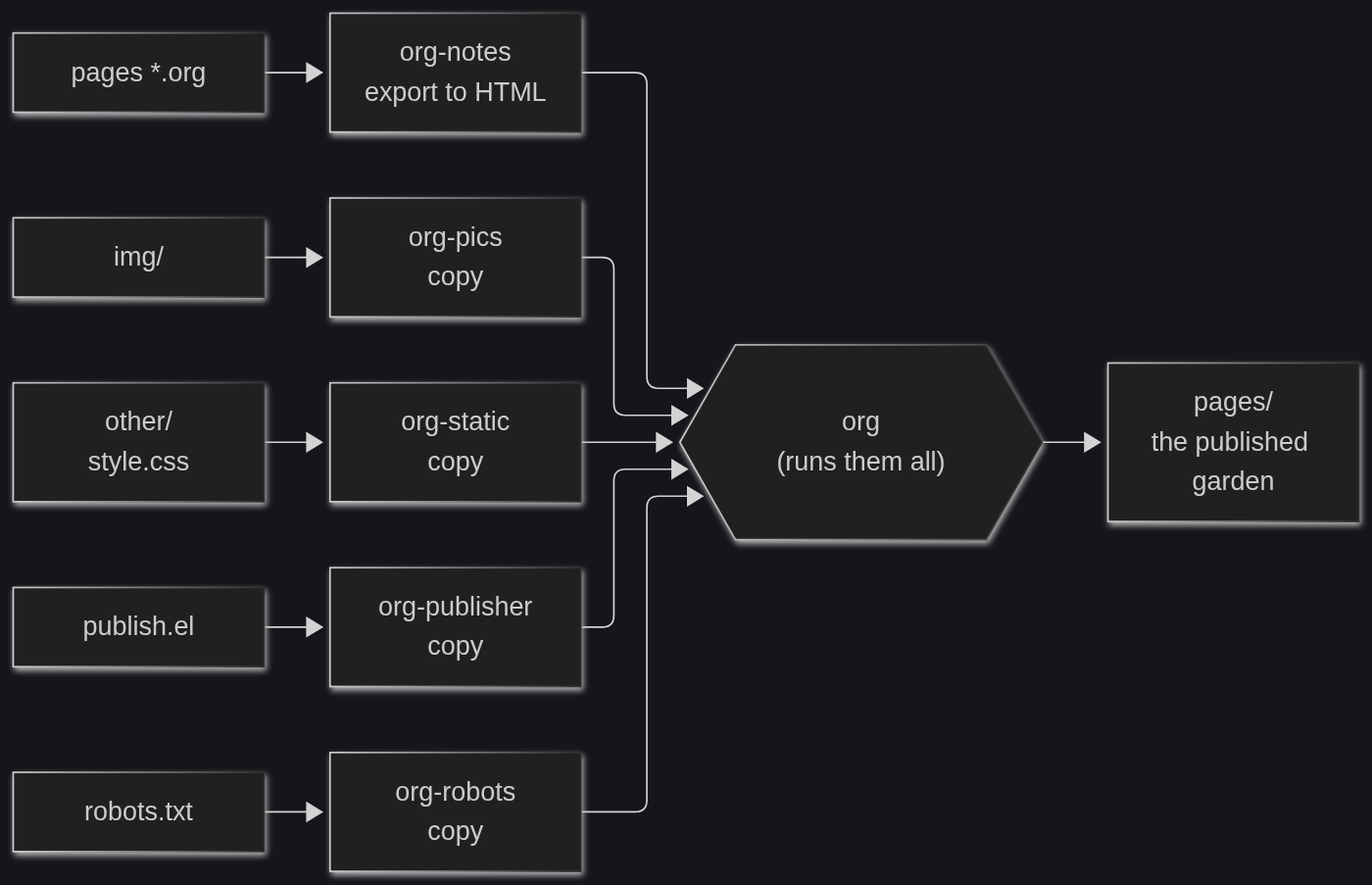
A component only needs a folder, an extension and a destination. This is the one for robots.txt:
("robots" :base-directory "./" :base-extension "txt" :publishing-directory "../pages/" :publishing-function org-publish-attachment)
His robots.txt asks AI crawlers, scrapers and site copiers to stay out of the garden.3
Thank you, Marco #
This post exists because Marco took the time to explain his setup in public, configuration and all, under a free license. If you build anything with Org, his Digital Garden page is worth reading in full, and the rest of his site shows what the setup produces. He takes feedback through issues on Codeberg.
-
The best-known karesansui is the rock garden of Ryōan-ji, in Kyoto: fifteen stones on a bed of white gravel, placed so that from any spot on the viewing veranda at least one of them stays hidden.
-
A project can set
:publishing-functionor:preparation-function, so a.dir-locals.elfrom someone else could make Emacs run code when you publish. That's why it asks before trusting the value. -
robots.txtis a convention from 1994 that became a standard, RFC 9309, in 2022. It's a request, and it only works with crawlers that choose to follow it.