Setting up soju as an IRC bouncer on Debian
Speaking of soju: in my last note I mentioned motd, an Android client that gets along well with it. This post is the other half. It walks through setting up soju on a Debian server, from the first apt install to a bouncer with a real certificate, its own accounts and a few networks, ready for any client.
What a bouncer does #
IRC is old and simple: a nick is only in a channel while its client is connected. Close the laptop, lose the signal on the phone, and it's gone. Whatever was said in the meantime never arrives.
A bouncer fixes that. It's a small program that runs on a server, stays connected to the IRC networks around the clock, and keeps what happens while nobody is looking. The clients connect to the bouncer instead of connecting to the networks directly. When someone comes back, the history is waiting, the nick never dropped, and every device sees the same conversations.
soju is a modern bouncer written in Go. It supports several users on the same server, many IRCv3 extensions, chat history playback, channels that can be "detached" to keep logging without cluttering the client, and an extension called soju.im/bouncer-networks that lets good clients see and manage every network over a single connection.
What it takes #
- A Debian 13 (trixie) server that stays on, like a small VPS or a home server
- A user with
sudo - A domain name pointing to the server, for example
irc.example.org, for a real TLS certificate - Port 6697/tcp open for IRC over TLS, and port 80/tcp open while the certificate is requested
Debian stable ships soju 0.9.0, which covers everything in this guide. Testing and unstable carry newer versions, for anyone who wants the latest features.
Step 1: install the package #
sudo apt update sudo apt install soju
The package does a lot of the boring work:
- creates a system user called
soju, with its data in/var/lib/soju - installs a systemd service called
soju.service, already enabled - writes a default config file at
/etc/soju/config - installs the
soju,sojuctlandsojudbcommands, plussoju-utilswith extra tools, like an importer for people moving from ZNC
Here's the default config Debian ships:
db sqlite3 /var/lib/soju/main.db message-store fs /var/lib/soju/logs/ listen ircs:// listen unix+admin:// tls /etc/ssl/certs/ssl-cert-snakeoil.pem /etc/ssl/private/ssl-cert-snakeoil.key
Line by line:
db sqlite3keeps users, networks and channels in a SQLite file. PostgreSQL is also supported, but SQLite is plenty for a personal bouncer.message-store fssaves the chat logs as plain files on disk, in the same format ZNC uses. The other option,message-store db, keeps messages in the database with a full-text search index, which helps clients that can search the history.listen ircs://listens for IRC over TLS on the standard port, 6697.listen unix+admin://opens an admin socket at/run/soju/admin, which is whatsojuctltalks to.tlspoints to Debian's "snakeoil" certificate,1 a self-signed certificate created on install. It works for a first test, but clients will rightly complain that they can't verify it. The next step replaces it.
Step 2: a real certificate #
Install certbot and ask Let's Encrypt for a certificate. The --standalone mode starts its own little web server on port 80 for a moment, so that port must be free and open:
sudo apt install certbot sudo certbot certonly --standalone -d irc.example.org
There's one detail to solve. Certbot saves the private key where only root can read it, and soju runs as the soju user. The cleanest fix is a small deploy hook that copies the certificate to soju's folder with the right owner, and tells soju to reload it. Certbot runs every script in that folder after each successful renewal.
Create /etc/letsencrypt/renewal-hooks/deploy/soju.sh:
#!/bin/sh set -e DOMAIN=irc.example.org install -d -m 0750 -o soju -g soju /var/lib/soju/tls install -m 0640 -o soju -g soju /etc/letsencrypt/live/$DOMAIN/fullchain.pem /var/lib/soju/tls/fullchain.pem install -m 0640 -o soju -g soju /etc/letsencrypt/live/$DOMAIN/privkey.pem /var/lib/soju/tls/privkey.pem systemctl reload soju
Make it executable and run it once by hand, since the first certificate already exists:
sudo chmod +x /etc/letsencrypt/renewal-hooks/deploy/soju.sh sudo /etc/letsencrypt/renewal-hooks/deploy/soju.sh
Debian's certbot package comes with a systemd timer that renews certificates on its own, and from now on every renewal ends with this script. The systemctl reload sends soju a HUP signal, which makes it reread the config file, the certificate and the key without dropping anyone.
Now edit /etc/soju/config to use the new certificate and the domain:
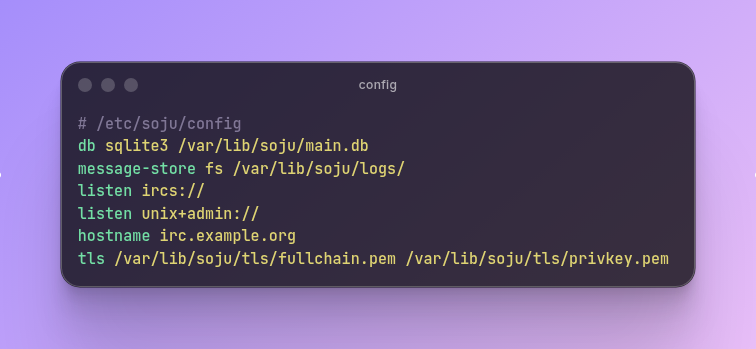
plain db sqlite3 /var/lib/soju/main.db message-store fs /var/lib/soju/logs/ listen ircs:// listen unix+admin:// hostname irc.example.org tls /var/lib/soju/tls/fullchain.pem /var/lib/soju/tls/privkey.pem
The hostname line tells soju its public name, which should be a full domain. Restart soju so it picks everything up:
sudo systemctl restart soju
Step 3: create the first user #
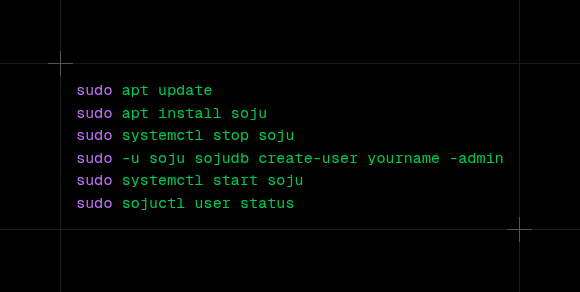
soju has no users after a fresh install. The simplest way to create the first one is sojudb, which writes straight to the database. The soju documentation asks for a restart of the daemon after changing the database this way, so stop it first:
sudo systemctl stop soju sudo -u soju sojudb create-user yourname -admin sudo systemctl start soju
sojudb asks for the password without echoing it, so it never ends up in the shell history. Running it as the soju user keeps the database file owned by the right account. The -admin flag makes this user an administrator, which is needed later to create more users and see server statistics.
To check that everything is up:
sudo systemctl status soju sudo sojuctl user status sudo sojuctl server status
sojuctl sends commands to the running bouncer through the admin socket, which is why it needs sudo. If something looks wrong, the logs are one command away:
sudo journalctl -u soju -f
Step 4: open the port #
With ufw, allowing IRC over TLS is one line:
sudo ufw allow 6697/tcp
Port 80 stays open too when certbot runs in standalone mode, since renewals need it. With another firewall, or one at the hosting provider, the idea is the same: 6697/tcp in.
Step 5: connect a client #
How a client connects depends on whether it understands soju's network extension.
Clients that understand soju #
Some clients were made with soju in mind, like goguma on Android and iOS, gamja in the browser and senpai in the terminal. motd on Android also manages soju networks. With these, a single server entry is enough:
- Server:
irc.example.org - Port:
6697, with TLS on - Username:
yourname - Password: the soju password
The client then shows every network configured in soju, and can add new ones from its own interface.
Every other client #
Clients like irssi, WeeChat, HexChat or Emacs' ERC see the bouncer as a regular IRC server, so each network gets its own server entry. The trick is in the username, which tells soju which network is wanted:
yourname/irc.libera.chat
If that network doesn't exist in soju yet and the name is a valid hostname, soju creates it on the spot and connects. With more than one client, a name for each one at the end keeps their places in the history apart:
yourname/irc.libera.chat@laptop yourname/irc.libera.chat@desktop
For irssi, for example:
/network add -user yourname/irc.libera.chat@laptop libera /server add -auto -tls -network libera irc.example.org 6697 yourpassword /connect libera
WeeChat has the soju.py script, which connects to every soju network from a single server entry.
Step 6: manage everything with BouncerServ #
soju has a built-in service called BouncerServ. It answers private messages like any other user, from any connected client. /msg BouncerServ help lists every command.
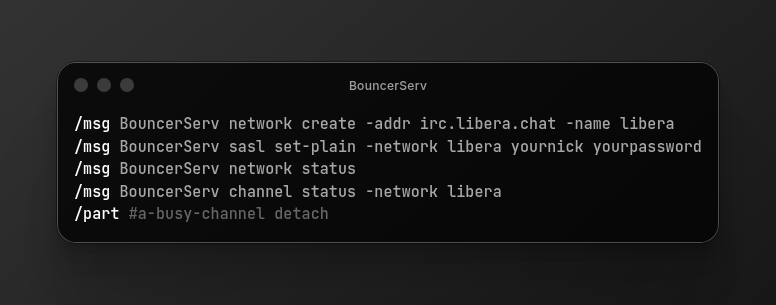
Add a network and give it a short name:
/msg BouncerServ network create -addr irc.libera.chat -name libera -nick yournick
Log in to the account on that network with SASL,2 so soju identifies the nick on every reconnect:
/msg BouncerServ sasl set-plain -network libera yournick yourpassword
SASL credentials only apply after a reconnect, so update the network afterwards, which makes soju reconnect:
/msg BouncerServ network update libera
To see where things stand:
/msg BouncerServ network status /msg BouncerServ channel status -network libera
Channels are simpler than they look. A normal /join #channel is enough, and soju remembers it, so it rejoins by itself on the next connection. /part leaves for good. To keep a busy channel logged without seeing it in the client, part it with the reason detach:
/part #a-busy-channel detach
The channel stays joined on the bouncer and keeps its history, and by default BouncerServ sends a notice when someone mentions the nick there. channel update changes that behavior, or makes a channel detach on its own after a period of silence.
An admin can also create accounts for friends:
/msg BouncerServ user create -username friend -password a-long-password
Day to day #
A few things worth knowing once it's running:
- Logs live in
/var/lib/soju/logs/, one folder per user and network, as plain text files that can be read or grepped. - Backups are easy: everything soju knows is inside
/var/lib/soju. A copy of that folder and/etc/soju/configis enough to rebuild the bouncer anywhere. - Config changes take effect with
sudo systemctl reload soju, except forlisten,dband the message store, which need a restart. - Updates come through
apt, like any other package. - Debug mode exists (
-debug, or/msg BouncerServ server debug true), but the documentation warns that it writes passwords to the logs. It's for chasing a problem, and goes off again right after.
And that's it: a bouncer that never sleeps, a real certificate that renews itself, and the networks waiting on every device.
-
The name comes from snake oil, the fake cure-all sold from wagons in the 1800s. A snakeoil certificate promises a security that nobody can check.
-
SASL lets the client prove who it is during the connection itself, before joining any channel. Without it, the nick identifies later with a message to NickServ, and for a moment it shows up in channels as unidentified.